Zobrazují se příspěvky se štítkemdesign. Zobrazit všechny příspěvky

čtvrtek 25. prosince 2025

How to identify faulty sensors in home automation

Home automation tend to be unreliable as it is composed of many individual components. If each component has 99.9% reliability, we have 100 statistically independent components, then we have only 99.9^100=90.5% chance that everything works. That is not much. Hence, we need to monitor the components and alert when they brake down.

I use 5 types of heuristics to trigger an alert that there is an issue with the sensor. For illustration, I will explain them on a wireless battery powered thermometer sensor:

  1. Too low/too high. When temperature in a boiler is above 90˚ C or below 30˚C, it is a sign of troubles.
  2. Unavailable. When the temperature reading is unavailable for 15 minutes, battery in the sensor died or the sensor got water damaged.
  3. Stuck. When the temperature reading AND signal strength (RSSI) is stuck at the same value for over 24 hours, the battery voltage is too low or the sensor needs to be restarted. I like to combine multiple sensors from the same device to decrease the false alert probability when it is plausible that the same value reading is legal. For example, the temperature in my basement is constant as long as no one opens the basement doors. Hence, if I measured only temperature, it would result in false alerts. On the other end, the battery powered thermometer next to the server is so close that RSSI is always at the maximal value. Hence, an alert based on RSSI alone would give false alerts. By requiring temperature AND RSSI to be stuck, I can use the same code for all my thermometers without false alerts. And I do not have to think about whether the particular sensor has more variable temperature or RSSI.
  4. Rapid change. Generally, when the temperature is increasing too quickly, it might be a sign of fire. Or that the battery is almost empty and the sensor became erratic.
  5. Noisiness. When the standard deviation of the temperature over the last hour is too high, the battery is dying.

Nevertheless, my single favorite alert trigger for network based sensors is a check whether the sensor's web page is loading, or not. It happened to me multiple time that a sensor was answering on ping. But otherwise the device was unresponsive. Hence, a ping is not sufficient. However, a simple HTTP status code check so far worked reliably and universally across all my network devices.

Does it mean ping alerts are useless? No. Once I had a faulty device. So I filled a warranty claim. But the claim was denied because "I have unreliable network and should hire professionals to fix it". So I presented them with the ping and HTTP status code historical logs for the device. The device was answering on ping. But web was 404. This was enough for them to accept the warranty claim. If I didn't have the ping logs, they could have claimed  that the Ethernet cable was faulty... But the fact that ping worked continuously for a week silenced them. Hence, having multiple alert triggers, even if they partially overlap, payed off for me. 

pondělí 25. listopadu 2024

Better debugging UI for CTE

One of the great advancements in SQL was introduction of Common Table Expressions (CTE), which made creation of long queries without creating intermediate tables on disk (or temporary tables if the database supports it) convenient.

However, debugging of long CTEs is difficult. To find the bug, I currently use bisection. I modify the query to show the first rows of some intermediate CTE somewhere in the middle of the query. If the CTE result looks OK, the bug is somewhere in the second part of the query. If the result does not look OK, I know that the bug is in the first half of the query. And this process repeats recursivelly, until I pinpoint the single offending CTE.

This approach works well on quickly running queries. However, once each query execution takes long time, the debugging drags as it requires multiple executions to just find the offending CTE, let alone to fix the CTE.

A possible mitigation is to enhance the query editor. Just like some query editors allow you to fold CTEs, the editor should present these information for each CTE:

  1. the CTE's row count
  2. an icon, which on click opens the CTE result

These informations should appear in the editor progressively, as they get available. With this approach, identification of the offending CTE should require, at most, 1 complete query execution. If you are lucky, just by looking at the row count of the intermediate CTEs, you spot the issue while the query is still running.

Technical limitations:

  1. The database ought to support temporary tables. This is needed for a simple implementation of the CTEs' result preview.
  2. While in the debugging mode, optimisation techniques that work across CTEs, like predicate pushdown, will not be applicable. This is acceptable as programmers expect a slow-down in the debug mode. However, it means that there has to be an additional "Debug" button next to the ordinary "Run" button. These two modes can't be mixed.

Future enhancements:
Do we want to store whole CTE results or only the top 1000 rows? If we store whole tables, we can use that to warm start the query execution, once we modify the query. The disadvantage of storing the whole results is that even a single query in the debugging mode can exhaust disk space and consequently prematurelly terminate, while in the ordinary run mode the query may finnish without any issue. Hence, the limit mode will likely have to be implemented. Nevertheless, for testing of the core idea, the limit/warm-start functionality is not needed.

neděle 23. července 2023

Dataframe API design

A dataframe is a convenient way how to represent tabular data.

However, dataframe libraries are notoriously tedious to implement, because a dataframe library should be feature-rich.

There were multiple attempts to simplify to problem.

One notable approach is to implement only operations on rows. And if you need to do something on columns, you first transpose the dataframe to convert the columns to rows. This simple trick reduced the size of API (count of methods) by roughly 1/3. Unfortunately, heterogeneous (composing of multiple different data types) dataframes are not the easiest to transpose. The author of the approach solved it by using dynamic typing - each cell contained information about its data type.

Can we further reduce the size of the API? I argue that the answer is yes. Each dataframe should have its own metaframe, which is nothing else but a dataframe with the metadata about the dataframe's columns. Metadata like column names, data types (like in information_schema.columns in SQL databases) and statistics like count of missing values, count of unique values, average, standard deviation and so on, which can be used for queries or query optimization. And these metadata should be manipulable and editable with exactly the same API as dataframe.

Hypothetical examples in Python syntax:
print(df)  # some dataframe instance
print(df.mf)  # the dataframe's metaframe
print(df.some_column_name)  # prints a column named "some_column_name"
 
# Rename a column.
# Commonly we would have a dedicated function or a method for this like:
#    column_name(df)[3] = "new_name"
# or
#    df.rename(columns={"old_name": "new_name"})
# but we reuse ordinary syntax for dataframe manipulation:
df.mf.column_name[3] = "new_name"


# Select columns without any missing value.
# Commonly we would have a dedicated function or a method for this like:
#    df[:, ~any(isnull(df))]
# or
#    df[:, ~df.isnull().any()]
# but we reuse ordinary syntax for dataframe manipulation by using missing_values column in the metaframe:
df[:, df.mf.missing_values == 0]

# Select columns with "good" substring.
df[:, regex(df.mf.column_name, ".*good.*")]

# Select integer typed columns.
df[:, df.mf.data_type=="integer"]

# Cast a column to string. Implementable with https:#stackoverflow.com/questions/51885246/callback-on-variable-change-in-python
df.mf.data_type[3]=="integer"
Metaframe should be open for addition of new columns as needed. For example, do you want to calculate feature importance and then filter based on that? Sure enough we can store the feature importance in an independent array and then filter based on the array:
feature_importance = get_feature_importance(df)
df[:, feature_importance>0]

But what if there are intermediate steps between feature_importance calculation and filtering, where you manipulate column position or add or delete columns? Suddenly, you have to keep feature_importance array synchronized with the df. And that can be tedious and error prone. But if you store feature_importance into metaframe, the dataframe library will take care of keeping it synchronized (when you add columns, the corresponding feature_importance value will be null - no magic).

However, if you wanted a bit of magic, the library might keep track of operations performed on columns and keep lineage of the columns. For example, the library might track which dataframes and columns were used in computation of the columns. This is useful in complex systems where it is sometimes difficult the origin of some data.

Implementation

Because we want to treat a metaframe as if it was a dataframe, metaframe has its own metadata. Hence, we get a never-ending chain of frames. This can be implemented as a linked list.

Without loss of generality, let's assume that each dataframe has 2 mandatory metadata attributes:
    column_names,
    data_types.
Additionally, each dataframe can have an unlimited count of optional metadata attributes, e.g.:
    roles,
    interpretations,
    notes,
    ...

Then the chain of the frames will eventually start to repeat with:

2 mandatory columns [column_names, data_types] and 2 rows that in column_names have: ["column_names", "data_types"].

We can treat it as a "sentinel node" in linked lists, which marks the end of the list - once we encounter it, it will be just referencing itself. Note that a single global "sentinel" can be shared by all frame chains.

However, if we want to make the data structure easier to serialize, we had better to avoid never-ending loops. To do that (and make the space overhead smaller), we might just use null in places, where we would reference the "sentinel" - it would be then up to the code to handle nullable metaframes (be it in the library or user code).

The final optional is to use dataframes even in the back end. We can a dataframe with an ordered list of dataframes, where for two neighboring dataframes it holds that the bottom one is a metaframe for the upper one. And the last row is the loopy metaframe. The advantage of this design is that in comparison to a sentinel, it is easy to serialize. And in comparison to the null design, the loopy metaframe can have additional columns, which can be important for some applications and generally evolution of the format.  


čtvrtek 10. března 2022

Gear icons

System Preferences icon in macOS 12 uses frustrating gears:

The reasons why they are frustrating:

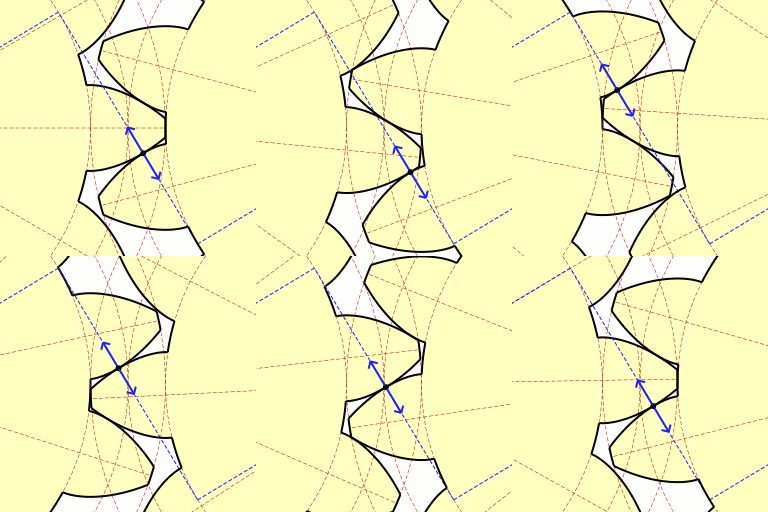
  1. The tooth's cross section is triangular.  
  2. The teeth are narrower than the space between the teeth.
  3. There is too many teeth.

Commonly, the teeth are curved to ensure good meshing of the gears:

Triangular/trapezoidal profile is commonly used only on gear racks:

or when we need the gears to come in to and out of engagement with each other without binding. If you use triangular profile, the torque transfer is irregular and there is be a lot of binding at some points and slop at others:

Furthermore, when two gears are made from the same material, it makes sense to use as wide teeth as the gap between the teeth to maximize the durability of the gearing.

Finally, the common count of teeth on a gear is commonly something around 20.


sobota 18. prosince 2021

Fraying apple cables

Low-voltage cables from Apple chargers are infamous for their durability issues:

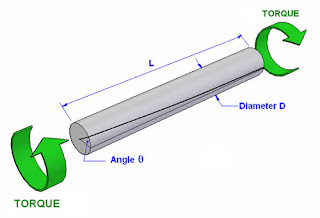
The issue is caused by repeated torsion of the cable:

As we expose the cable to torsion, the rubber jacket eventually separates from the braid:

However, this separation is already present from the factory at the cable ends as the braid is pulled to one side:

This separation is troublesome because when we further twist the cable, the braid works like a grater, which "eats" the rubber jacket. And eventually, the cable frays.

How to change the cable design to fix fraying:

  1. Make the rubber jacket thicker. Apple has already done that with Lightning cables. However, this just delays the fraying.
  2. Wrap the braid in a foil, to separate the jacket from the braid. The jacket will then nicely slide over the foil instead of getting grated by the braid. The common thickness of the foil is 50 μm. But it can be made as thin as 6 μm. Hence, this change could increase the thickness of the cable only by 12 μm. For comparison, typical hair is 75 μm thick.
Conclusion: It is well known that Apple uses badly designed "strain reliefs" at the cable ends. But that does not explain why the cables fray in the middle (as illustrated in the first photo) as well and not just at the ends.

čtvrtek 17. května 2012

Soup bowl from a brick

I have been examined on creativity and asked "For what can you use a brick?". And I thought about using a brick as a soup bowl in a restaurant. Just imagine the eyes of a surprised guest when you tell him "here is your soup" and all he can see is a plate with a steaming brick. The same brick from which the restaurant is built.

How to create a bowl from a brick:
  1. You need a high quality brick, which doesn't crumble. It can have decorative imprints on it's sides.
  2. Use lathe to carve a bath into the brick. It's possible to carve a logo into the sides of the bowl.
  3. Use hydrophobic impregnation to prevent soaking of water by the brick during the washing. 
  4. Glaze the inside of the bath so the customer has a sense of cleanliness.